Tutorial: Quality Control Pipeline in Practice
This tutorial provides hands-on experience running the quality control (QC) pipeline in GDCGenomicsQC. The pipeline implements a two-stage approach: Initial QC (sample and variant missingness filtering) followed by Standard QC (MAF, HWE, heterozygosity, and optional sex checking).
Estimated completion time: 20-30 minutes
Learning objectives:
Run the Initial QC and Standard QC pipelines
Interpret output plots and data files
Configure QC thresholds for different study designs
Apply ancestry-specific QC workflows
Prerequisites
Setup:
Before starting, ensure you have access to Snakemake and the GDCGenomicsQC workflow. For detailed installation instructions, see:
Installation - Software setup (module, conda, or other methods)
Usage - Running the pipeline
If you’re using the MSI HPC cluster:
module use /projects/standard/gdc/public/GDCGenomicsQC/envs
module load gdcgenomicsqc
conda activate snakemake
Verify installation:
cd GDCGenomicsQC
snakemake --version
If you’re using the Sandbox environment:
module use /scratch.global/GDC/GDCGenomicsQC/envs
module load gdcgenomicsqc
conda activate snakemake
Verify installation:
cd GDCGenomicsQC
snakemake --version
If your HPC has the GDC module pre-configured:
# Replace with your HPC's module path:
module use /path/to/GDCGenomicsQC/envs
module load gdcgenomicsqc
conda activate snakemake
Verify installation:
cd GDCGenomicsQC
snakemake --version
If you’re using your own Snakemake installation:
conda activate snakemake
cd GDCGenomicsQC
Verify installation:
snakemake --version
Data Requirements:
Reference data configured (see Tutorial: Assembling 1000 Genomes Reference Data)
Genotype data in VCF, BED, or PGEN format
DAG Visualization
The pipeline DAG up to the run_initialQC rule shows the Initial QC workflow:
        ---
title: DAG
---
flowchart TB
	id0[run_initialQC]
	id1[kgMeta]
	id2[Standard_QC]
	id3[convertNfilt - CHR: 1 - subset: full]
	id4[convertNfilt - CHR: 2 - subset: full]
	id5[convertNfilt - CHR: 3 - subset: full]
	id6[convertNfilt - CHR: 4 - subset: full]
	id7[convertNfilt - CHR: 5 - subset: full]
	id8[convertNfilt - CHR: 6 - subset: full]
	id9[convertNfilt - CHR: 7 - subset: full]
	id10[convertNfilt - CHR: 8 - subset: full]
	id11[convertNfilt - CHR: 9 - subset: full]
	id12[convertNfilt - CHR: 10 - subset: full]
	id13[convertNfilt - CHR: 11 - subset: full]
	id14[convertNfilt - CHR: 12 - subset: full]
	id15[convertNfilt - CHR: 13 - subset: full]
	id16[convertNfilt - CHR: 14 - subset: full]
	id17[convertNfilt - CHR: 15 - subset: full]
	id18[convertNfilt - CHR: 16 - subset: full]
	id19[convertNfilt - CHR: 17 - subset: full]
	id20[convertNfilt - CHR: 18 - subset: full]
	id21[convertNfilt - CHR: 19 - subset: full]
	id22[convertNfilt - CHR: 20 - subset: full]
	id23[convertNfilt - CHR: 21 - subset: full]
	id24[convertNfilt - CHR: 22 - subset: full]
	id25[initialFilter]
	style id0 fill:#57D5D9,stroke-width:2px,color:#333333
	style id1 fill:#57D95F,stroke-width:2px,color:#333333,stroke-dasharray: 5 5
	style id2 fill:#D9A657,stroke-width:2px,color:#333333
	style id3 fill:#ADD957,stroke-width:2px,color:#333333
	style id4 fill:#ADD957,stroke-width:2px,color:#333333
	style id5 fill:#ADD957,stroke-width:2px,color:#333333
	style id6 fill:#ADD957,stroke-width:2px,color:#333333
	style id7 fill:#ADD957,stroke-width:2px,color:#333333
	style id8 fill:#ADD957,stroke-width:2px,color:#333333
	style id9 fill:#ADD957,stroke-width:2px,color:#333333
	style id10 fill:#ADD957,stroke-width:2px,color:#333333
	style id11 fill:#ADD957,stroke-width:2px,color:#333333
	style id12 fill:#ADD957,stroke-width:2px,color:#333333
	style id13 fill:#ADD957,stroke-width:2px,color:#333333
	style id14 fill:#ADD957,stroke-width:2px,color:#333333
	style id15 fill:#ADD957,stroke-width:2px,color:#333333
	style id16 fill:#ADD957,stroke-width:2px,color:#333333
	style id17 fill:#ADD957,stroke-width:2px,color:#333333
	style id18 fill:#ADD957,stroke-width:2px,color:#333333
	style id19 fill:#ADD957,stroke-width:2px,color:#333333
	style id20 fill:#ADD957,stroke-width:2px,color:#333333
	style id21 fill:#ADD957,stroke-width:2px,color:#333333
	style id22 fill:#ADD957,stroke-width:2px,color:#333333
	style id23 fill:#ADD957,stroke-width:2px,color:#333333
	style id24 fill:#ADD957,stroke-width:2px,color:#333333
	style id25 fill:#7ED957,stroke-width:2px,color:#333333
	id2 --> id0
	id3 --> id0
	id4 --> id0
	id5 --> id0
	id6 --> id0
	id7 --> id0
	id8 --> id0
	id9 --> id0
	id10 --> id0
	id11 --> id0
	id12 --> id0
	id13 --> id0
	id14 --> id0
	id15 --> id0
	id16 --> id0
	id17 --> id0
	id18 --> id0
	id19 --> id0
	id20 --> id0
	id21 --> id0
	id22 --> id0
	id23 --> id0
	id24 --> id0
	id25 --> id0
	id25 --> id2
	id1 --> id3
	id1 --> id4
	id1 --> id5
	id1 --> id6
	id1 --> id7
	id1 --> id8
	id1 --> id9
	id1 --> id10
	id1 --> id11
	id1 --> id12
	id1 --> id13
	id1 --> id14
	id1 --> id15
	id1 --> id16
	id1 --> id17
	id1 --> id18
	id1 --> id19
	id1 --> id20
	id1 --> id21
	id1 --> id22
	id1 --> id23
	id1 --> id24
	id1 --> id25
	id3 --> id25
	id4 --> id25
	id5 --> id25
	id6 --> id25
	id7 --> id25
	id8 --> id25
	id9 --> id25
	id10 --> id25
	id11 --> id25
	id12 --> id25
	id13 --> id25
	id14 --> id25
	id15 --> id25
	id16 --> id25
	id17 --> id25
	id18 --> id25
	id19 --> id25
	id20 --> id25
	id21 --> id25
	id22 --> id25
	id23 --> id25
	id24 --> id25
The rule graph provides a cleaner view of rule dependencies:
        ---
title: DAG
---
flowchart TB
	id0[run_initialQC]
	id1[kgMeta]
	id2[Standard_QC]
	id3[convertNfilt]
	id4[initialFilter]
	style id0 fill:#57D5D9,stroke-width:2px,color:#333333
	style id1 fill:#57D95F,stroke-width:2px,color:#333333
	style id2 fill:#D9A657,stroke-width:2px,color:#333333
	style id3 fill:#ADD957,stroke-width:2px,color:#333333
	style id4 fill:#7ED957,stroke-width:2px,color:#333333
	id2 --> id0
	id3 --> id0
	id4 --> id0
	id4 --> id2
	id1 --> id3
	id1 --> id4
	id3 --> id4
Required Input Files
This step requires the following input files:
Input File |
Description |
|---|---|
|
Per-chromosome VCF, BED, or PGEN files with genotype data |
|
Reference panel population labels (for ancestry QC subsets) |
|
Reference genome FASTA (if using reference allele correction) |
Input Formats Supported:
The pipeline automatically detects format based on file extension:
Config Parameters for QC:
INPUT: "/path/to/data/chr{CHR}.vcf.gz"  # Per-chromosome VCF
OUT_DIR: "/path/to/output"
REF: "/path/to/reference"
local-storage-prefix: "/path/to/.snakemake/storage"

chromosomes: [1, 2, 3, 4, 5, 6, 7, 8, 9, 10, 11, 12, 13, 14, 15, 16, 17, 18, 19, 20, 21, 22]

# QC thresholds
relatedness:
    method: "king"  # "0" for none, "king" for removal
    king_cutoff: 0.0884

SEX_CHECK: true  # Enable/disable sex verification
GRM: true  # Compute genetic relationship matrix
thin: false
See also: Usage for configuration options, Installation for software setup.
Lab Exercise: Running QC Pipeline
Step 1: Create Configuration File
Create a configuration file for QC:
mkdir -p ~/qc_lab
cd ~/qc_lab
cat > config_qc.yaml << 'EOF'
INPUT: "/path/to/data/chr{CHR}.vcf.gz"
OUT_DIR: "/path/to/output/directory"
REF: "/path/to/reference/data"
local-storage-prefix: "/path/to/.snakemake/storage"

chromosomes: [1, 2, 3, 4, 5, 6, 7, 8, 9, 10, 11, 12, 13, 14, 15, 16, 17, 18, 19, 20, 21, 22]

relatedness:
    method: "0"
    king_cutoff: 0.0884

SEX_CHECK: true
thin: false
conda-frontend: mamba
EOF
Key parameters:
SEX_CHECK: Enable/disable sex verification (default: true)relatedness.method: Relatedness filtering method (“0” for none, “king” or “primus” for removal)
Step 2: Run Initial QC
cd GDCGenomicsQC/workflow
gdcgenomicsqc --configfile ../config_qc.yaml full/initialFilter.pgen -j 10
cd GDCGenomicsQC/workflow
gdcgenomicsqc --configfile ../config_qc.yaml full/initialFilter.pgen -j 10
cd GDCGenomicsQC/workflow
gdcgenomicsqc --configfile ../config_qc.yaml full/initialFilter.pgen -j 10
cd GDCGenomicsQC/workflow
snakemake --profile=../profiles/hpc \
    --configfile ../config_qc.yaml \
    full/initialFilter.pgen \
    -j 10
The Initial QC stage performs:
Sample missingness (initial): Removes samples with >10% missing genotypes (
--mind 0.1)Variant missingness: Removes variants with >2% missingness (
--geno 0.02)Sample missingness (final): Removes samples with >2% missingness (
--mind 0.02)LD pruning: Creates pruned dataset for downstream analyses (
--indep-pairwise 500 10 0.1)
Step 3: Run Standard QC
gdcgenomicsqc --configfile ../config_qc.yaml full/standardFilter.pgen -j 10
gdcgenomicsqc --configfile ../config_qc.yaml full/standardFilter.pgen -j 10
gdcgenomicsqc --configfile ../config_qc.yaml full/standardFilter.pgen -j 10
snakemake --profile=../profiles/hpc \
    --configfile ../config_qc.yaml \
    full/standardFilter.pgen \
    -j 10
The Standard QC stage applies additional filters:
Minor Allele Frequency (MAF): Removes variants with MAF < 1% (
--maf 0.01)Hardy-Weinberg Equilibrium (HWE): Removes variants failing HWE at p < 1×10⁻⁶ (discovery) and p < 1×10⁻¹⁰ (validation)
Heterozygosity check: Identifies samples with FWER > 3 standard deviations from mean
Sex check: Optionally verifies reported sex matches genetic sex
Step 4: Run Ancestry-Specific QC
After ancestry classification, run QC on specific ancestry groups:
gdcgenomicsqc --configfile ../config_qc.yaml EUR/standardFilter.pgen -j 10
gdcgenomicsqc --configfile ../config_qc.yaml EUR/standardFilter.pgen -j 10
gdcgenomicsqc --configfile ../config_qc.yaml EUR/standardFilter.pgen -j 10
snakemake --profile=../profiles/hpc \
    --configfile ../config_qc.yaml \
    EUR/standardFilter.pgen \
    -j 10
Available subsets are dynamically determined from classification results.
Visualizations
Reference Space (PCA): images/PC_reference_space.svg
Reference panel samples in PC space with density contours
Shows how target samples map to known ancestry groups
Reference Space (UMAP): images/UMAP_reference_space.svg
Reference panel samples in UMAP embedding with density contours
Nonlinear visualization of ancestry structure
Interpreting Pipeline Outputs
Sample Missingness Plot
File: {subset}/figures/smiss.svg
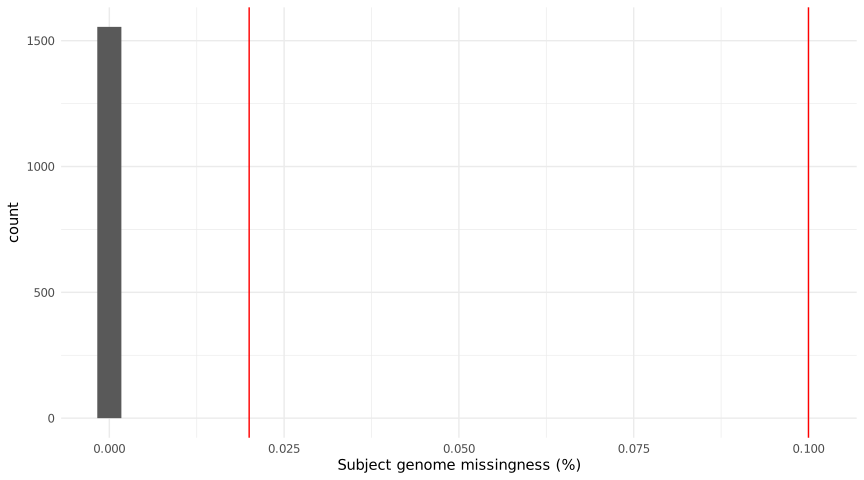
The sample missingness histogram shows the distribution of missing data per individual.
X-axis: Percentage of genotype calls missing per sample
Red vertical lines: Threshold cutoffs (10% initial, 2% final)
Samples to the right of the rightmost line are removed
Note: Since we used synthetic and (in case of the R25 data) imputed data, we don’t expect to see any missingness in this exercise.
Standard interpretation:
Sharp peak at low values: Good quality data
Long right tail: Problematic samples requiring investigation
Bimodal distribution: Possible batch effects or technology issues
Variant Missingness Plot
File: {subset}/figures/vmiss.svg
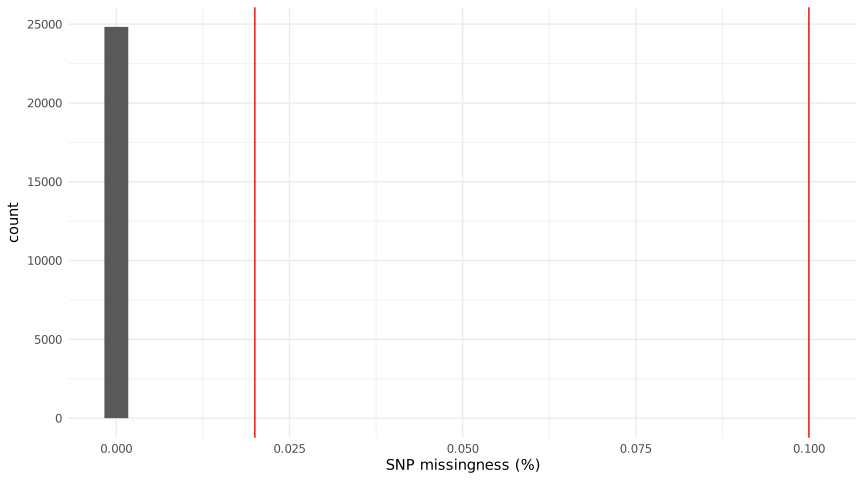
The variant missingness histogram shows the distribution of missing data per SNP.
X-axis: Percentage of samples missing genotype call per variant
Red vertical lines: Threshold cutoffs
Variants to the right of the line are removed
Note: Since we used synthetic and (in case of the R25 data) imputed data, we don’t expect to see any missingness in this exercise.
Standard interpretation:
Concentrated at low values: Clean variant calling
Long right tail: Possible strand flip issues, poor quality regions, or structural variants
Unplotted Output Files
The QC pipeline generates many intermediate files for detailed analysis:
Initial QC Outputs:
Standard QC Outputs:
Sample contents of initial.smiss:
IID |
FID |
F_MISS |
N_MISS |
|---|---|---|---|
S001 |
FAM001 |
0.001 |
150 |
S002 |
FAM001 |
0.008 |
1200 |
Sample contents of R_check.het:
The heterozygosity rate is calculated as: (N.NM. - O.HOM.) / N.NM.
Discussion Points: Multi-Ancestry and Admixed Study Designs
These questions explore QC considerations for diverse and admixed populations:
Ancestry-specific allele frequencies: The MAF filter (default 1%) may remove informative variants in population-specific contexts. How should MAF thresholds differ between ancestry groups? Should multi-ancestry studies use uniform or group-specific thresholds?
HWE assumptions: HWE testing assumes a randomly mating population. For admixed individuals, this assumption is violated. Should HWE filters be applied before or after ancestry classification? How do systematic departures from HWE in admixed populations affect downstream analysis?
Heterozygosity in admixed samples: Admixed individuals have higher heterozygosity than homogeneous populations. Does the 3-SD threshold appropriately capture excess heterozygosity as an outlier versus natural admixture? How does this affect false positive rates?
Missingness patterns: Samples with high global ancestry proportions may have higher missingness if reference panels poorly represent their ancestry. How should missingness thresholds account for reference panel coverage across diverse populations?
Sex chromosome handling: The pseudoautosomal regions and sex chromosome ploidy differ between ancestries. How should X-chromosome heterozygosity filters be adjusted for multi-ancestry studies?
Relatedness in family-structured populations: For studies with family structure across ancestries, should KING or PRIMUS be used? How does population structure affect kinship coefficient estimates?
Differential QC power: Some ancestry groups may have more variants removed due to technology bias (e.g., array density). How does differential QC success affect downstream GWAS power and potential for bias?
Strand alignment: Poorly aligned variants show as missing in specific ancestry groups. How do you distinguish true missingness from strand issues in multi-ancestry data?
For theoretical foundations—including population genetics principles, statistical tests for QC metrics, and best practices for diverse populations—refer to the accompanying lecture materials.
Next Steps
After completing this tutorial, proceed to:
Tutorial: Ancestry Classification in Practice - Classify ancestry using the QC-filtered data
Tutorial: Heritability Estimation with Multi-Ancestry Simulation - Estimate heritability using QC-filtered genotypes
See also:
Installation - Software setup (if not already done)
Usage - Running the full pipeline
Genomics - Technical details on QC methods